Support
Pottery Marks: Porcelain ID
Photographing a mark
- Fill the frame with the mark and tap it to focus. Natural light beats the flash.
- Glare on glaze? Tilt the piece slightly away from the light.
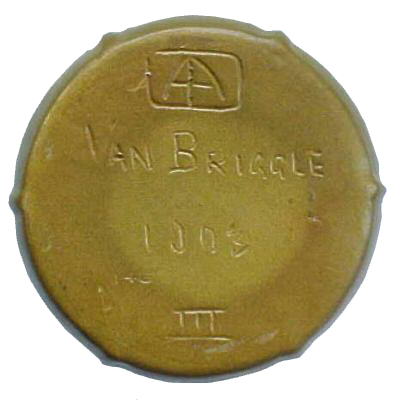
- Impressed or incised marks (pressed or scratched into the clay, common on American art pottery): hold a torch low, almost flat to the surface, so every letter casts a shadow.
- Paper stickers and price labels aren't maker's marks.
Want to try it without pottery? Save this sample photo of a public-domain Van Briggle base, then use Choose from Photos.
Reading the result
"Two independent reads agree"
Two different AI models read the mark and named the same maker. Only then does the app state a maker.
"Possibly"
The two reads disagreed, or only one could name a maker. The candidates are shown, but neither is an answer. Try a sharper, closer photo, or add a close-up (Premium): both reads look at your first photo and the close-up together. A "possibly" result doesn't use a free answer.
"We couldn't read this mark"
Neither read could name a maker. Sometimes there simply isn't one on the piece. This doesn't use a free answer either.
The maker is wrong
Tap Correct maker on the result. Your correction is saved on your phone and used for the dating; it isn't sent anywhere. Please email us the photo if you can: it helps us improve.
Dates
The date is the range in which that version of the mark was used, narrowed by evidence printed on the mark itself: a registration number, a diamond mark, country names such as Nippon or West Germany, or a maker's own date code. Why this date lists every piece of evidence. A registration number dates the design's registration, so a piece can't be older than it, but production often continued for years.
Free answers and Premium
What's free?
3 answers, plus the offline tools. "Possibly", unreadable and failed results don't count.
What does Premium add?
Every mark you find, close-up second shots, full history and CSV export: $6.99 a month or $39.99 a year (7-day free trial on the annual plan). Fair use: up to 200 answers a month.
How do I cancel or restore?
Cancel in iPhone Settings → your name → Subscriptions. Restore in the app's Settings → Restore Purchases.
Your data
Photos are read and discarded; we never store them. Your history lives on your phone: delete scans in History, or everything in Settings → Delete All Scans. See the privacy policy.
Contact
Email support@bulpara.com.